</>

INTERNAL TESTING BUILD

</>

CONFIDENTIAL & SUBJECT TO CHANGE

Find answers, ask questions, and connect with our community around the world.

Home › Q&A Forum › Computer Help › Kims New YouTube trick not working

  • Kims New YouTube trick not working

    Posted by xray10 on 09/07/2023 at 11:12 AM

    Kim posted this
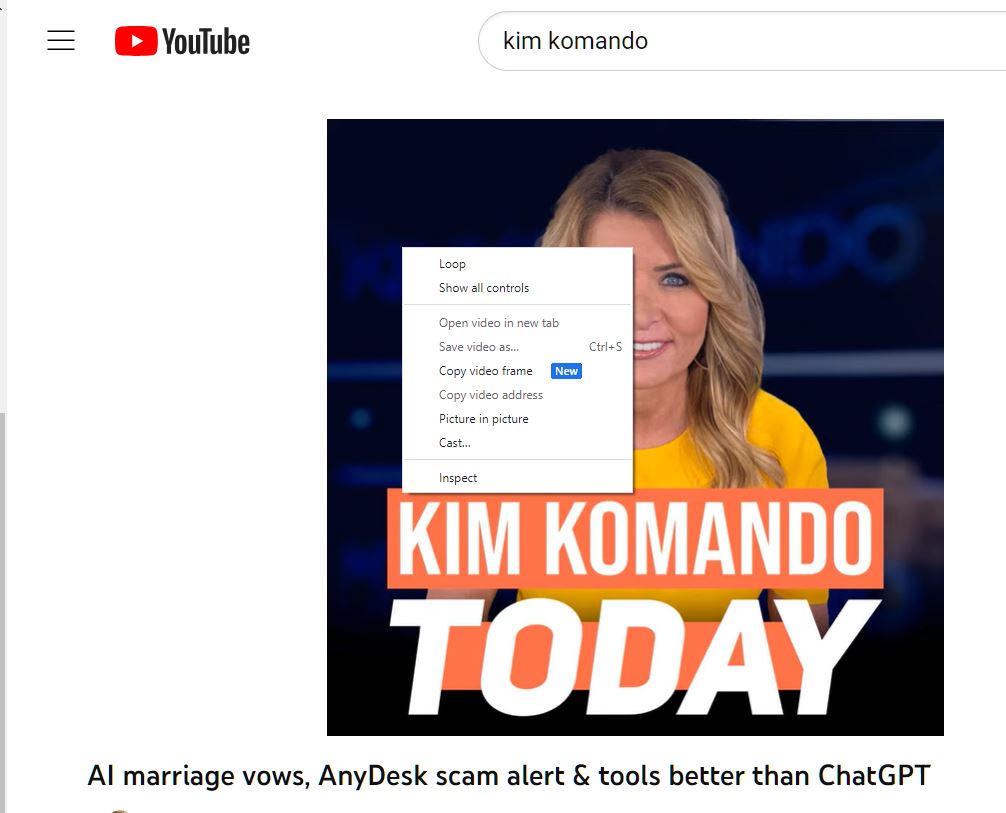
    New YouTube trick: There might be a good reason you need a solid screenshot of a single frame of a YouTube video. Now, it’s easy to do. Pause the video, right-click and select Copy video frame. Sweet! Just paste it into a chat, image editor or document.

    There is no copy video frame.
    Right-clicking shows only:
    Loop
    Copy video URL
    Copy video URL at the current time
    Copy embed code
    Copy debug info
    Troubleshoot playback issue
    Stats for nerds
    ?
    Windows 11/Chrome

    TeamKomandoJohn replied 3 years ago 2 Members · 1 Reply
  • 1 Reply
  • TeamKomandoJohn

    Administrator
    09/11/2023 at 12:28 PM

    Hey there Thomas Wypa,

    There is a second right-click menu, be careful not to right-click on the first subcontext menu otherwise, you might not see the second menu. From here you will see the new available features. Additionally, you must be using Google Chrome or a Chromium-based browser such as Microsoft Edge, Samsung Internet or Opera.

    Second Right-Click

Log in to reply.