</>

INTERNAL TESTING BUILD

</>

CONFIDENTIAL & SUBJECT TO CHANGE

Find answers, ask questions, and connect with our community around the world.

Home › Q&A Forum › Advanced Tech Support › Google Chrome Printing

  • Google Chrome Printing

    Posted by Mark Bender on 03/07/2021 at 5:37 PM

    I’m have trouble getting my Google Chrome Book to print to my wifi Brother printer. I’m following along how you do it but it’s not working. Could it be firmware stoping a chrome print to a brother? Or some other reason might cause the problem?

    TeamKomandoJohn replied 5 years, 7 months ago 2 Members · 8 Replies
  • 8 Replies
  • TeamKomandoJohn

    Administrator
    03/08/2021 at 10:40 AM

    Hello Fairhavens,

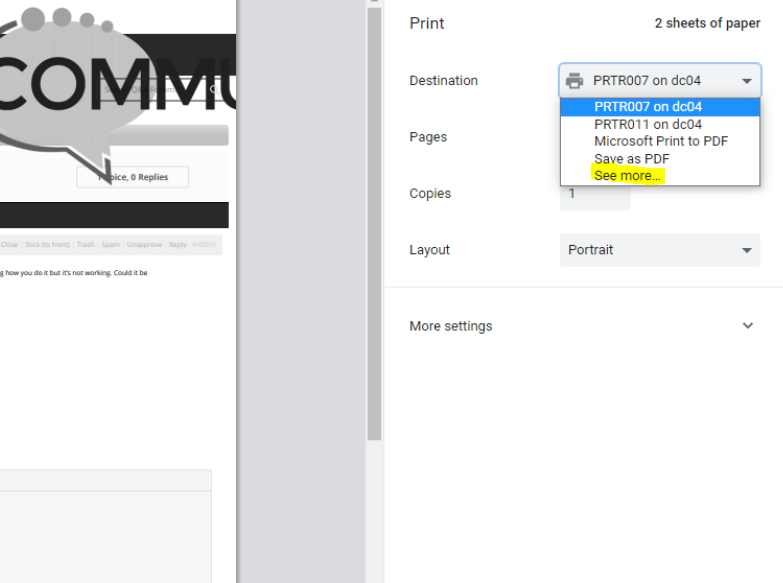
    If you are able to print from say notepad, but not from Chrome you can take a look at the image below. . When printing you may have to click the destination then click on see more, to show your brother printer.

    Chrome Print Dialogue

    If you are unable to print to your Brother printer say using notepad, Microsoft Word, or any other application you should attempt reinstalling the print driver.

  • Mark Bender

    Member
    03/08/2021 at 11:52 AM

    It’s a Google Chrome Book that can’t print to brother printer. Google environment ….

  • TeamKomandoJohn

    Administrator
    03/08/2021 at 2:42 PM

    Hello Fairhavens,

    What is the model number of your Brother printer?

    • TeamKomandoJohn

      Administrator
      03/08/2021 at 2:43 PM

      Also, have you rebooted the printer?

  • Mark Bender

    Member
    03/08/2021 at 5:49 PM

    The Brother printer is MFC 9130CW. Hardly used but by me…. but the MacBook Pro works with it fine. Haven’t tried my Microsoft wkst.

  • TeamKomandoJohn

    Administrator
    03/09/2021 at 11:09 AM

    Hello Fairhavens,

    What Chromebook are you using, I would attempt installing this software here on your Chromebook.

  • Mark Bender

    Member
    03/09/2021 at 12:17 PM

    What’s the link URL?

  • TeamKomandoJohn

    Administrator
    03/10/2021 at 9:21 AM

Log in to reply.